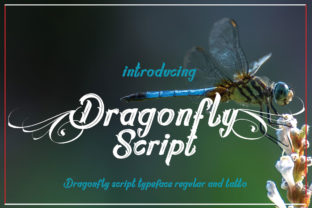
Dragonfly Script Font: A Lightweight Elegance for Web Design
As a web designer who’s always on the lookout for fonts that bring personality without sacrificing clarity, I recently had the chance to work with Dragonfly Script in a real project. It was part of a redesign for a boutique online store selling natural skincare products. The goal was to give the site a soft, artisanal feel while maintaining strong readability across devices and content types. Dragonfly Script quickly became my go-to choice for headers and decorative elements.
Elegant and Effortless: The Visual Character of Dragonfly Script
Dragonfly Script is a handwritten typeface that exudes warmth and grace. Its light weight and fluid strokes make it feel approachable yet refined. Unlike heavier script fonts that can overwhelm a layout, this one has a delicate balance—enough character to stand out but not so much that it becomes hard to read at smaller sizes or on mobile screens.
I found myself drawn to its subtle variations in stroke thickness and the gentle flow between letters. It doesn’t have the dramatic flair of some calligraphy-style scripts, which makes it more versatile for digital use. The font feels like a whisper of creativity rather than a shout, and that’s exactly what many brands need to convey authenticity and calm confidence.
Perfect for Display Use, Not Dense Text
When working on the hero section of the skincare site, I used Dragonfly Script for the headline. The result was stunning. The font added a personal touch that immediately set the tone for an organic, handcrafted brand. But I also made sure to keep body copy in a clean sans serif to maintain contrast and legibility.
Script Amp clearly designed this as a display font, and that’s where it shines brightest. I’ve seen too many sites try to use decorative scripts for long paragraphs, and it rarely works well. Dragonfly Script isn’t meant for that. Instead, it excels in short phrases, logo text, and button labels—elements where visual impact matters most and reading speed is less critical.
Responsive Layouts and Cross-Device Performance
One of the first things I tested was how Dragonfly Script performed on different screen sizes. I placed it over a full-width image banner for a seasonal promotion page and watched how it scaled down from desktop to tablet to phone. Even at 24px on a smartphone, the characters remained distinct and easy to read.
This is a big plus for any web designer. Many script fonts lose their charm when compressed for mobile, but Dragonfly Script maintains its elegance. I especially appreciated how it handled white space and negative space around each letterform. It didn’t feel cramped or cluttered, even when layered over a textured background.
For buttons and call-to-action sections, I paired it with bold spacing and a light outline to ensure it stood out against darker tones. It worked beautifully in those contexts—adding just enough whimsy to encourage clicks without distracting from the message.
Font Pairing Suggestions for Digital Projects
Every great display font needs a good partner. For the skincare site, I paired Dragonfly Script with a minimalist sans serif—something like Montserrat or Lato. This combination gave the design both emotional appeal and functional clarity. The script font brought the brand’s story to life, while the sans serif kept the information scannable and digestible.
If you're leaning toward a more editorial or blog-heavy design, consider pairing it with a simple serif font like Merriweather or Georgia. The contrast between the two styles adds depth and sophistication to your layout. Just be careful not to mix too many script fonts together; they can muddy the visual hierarchy if not used thoughtfully.
Use Cases That Work Well in Web Design
- Boutique Online Store Headers: Dragonfly Script elevates the look of product pages by adding a handmade aesthetic to titles and taglines.
- Creative Portfolio Titles: For designers, illustrators, or artists showcasing their work, this font gives a personal and professional edge.
- Landing Page Headlines: Especially on lifestyle or wellness websites, the font adds a sense of warmth and intentionality.
- Course Sales Pages: When promoting creative courses or workshops, Dragonfly Script helps create a welcoming, human-centric vibe.
- Social Media Graphics: Though not the focus here, I've used it in preview images for landing pages and it looks fantastic in limited runs of decorative text.
I also tried using it in SVG-style banners for a campaign landing page. The curves and ligatures translated cleanly into vector format, making it ideal for animated headings or downloadable templates. It’s clear that Script Amp considered digital rendering in their design process.
Where to Be Cautious
While Dragonfly Script is a joy to work with in the right context, it’s important to avoid using it for long blocks of text or small navigation menus. In one test, I applied it to a dropdown menu and found that users had trouble scanning options quickly. It's simply not built for dense or fast-read interfaces.
Also, if your website requires strict accessibility compliance, such as for government or healthcare clients, this font might not be the best fit due to its ornamental nature. Always consider the user experience and whether the font supports quick scanning and comprehension.
Branding and Brand Consistency
One of the most exciting aspects of using Dragonfly Script is how it contributes to brand identity. On the skincare site, it helped differentiate the brand from competitors using generic sans serifs. The font created a sense of care and craftsmanship that resonated with the target audience.
In another project—a coaching website—I used it for section headings and testimonials. It softened the overall tone and made the content feel more personal and relatable. The font became a key element of the brand’s voice, subtly reinforcing values like authenticity and connection.
For digital branding kits, it's worth checking the included styles and alternates. Script Amp offers multiple weights and swash options, allowing for customization without needing to switch fonts entirely. This flexibility is essential when building cohesive visual identities across various platforms and media formats.
Commercial Licensing and Practical Considerations
Before finalizing the font in production environments, I always check the licensing terms. Dragonfly Script comes with commercial font rights, which means it’s safe to use on client websites, online stores, and branded assets. Whether you're designing for a hobbyist blogger or a growing SaaS company, having the right permissions ensures peace of mind and legal compliance.
It also includes multilingual support, which is crucial for international audiences. The file formats are standard (OTF, TTF, WOFF), and it loads efficiently in web projects. I recommend testing the font in your preferred CSS stack to see how it behaves under different conditions—especially if you're optimizing for performance on slower connections.
Designing with Dragonfly Script in Mind
Here are a few practical tips I picked up while integrating Dragonfly Script into real layouts:
- Use it for large-scale display text: Hero headlines, feature titles, and promotional banners benefit most from its expressive style.
- Avoid dark-on-dark combinations: Because of its light feel, it’s better to place it on lighter or neutral backgrounds to maintain visibility.
- Test it on mobile early: Ensure it scales well and remains legible in smaller viewports before going live.
- Limit the number of alternates: Too many swashes or ligatures can make the text feel inconsistent or confusing, especially in logos or repeated UI elements.
On the downside, there were a few instances where I’d hesitate to use it. For example, I wouldn't recommend it for dashboard-style interfaces, form fields, or anything requiring precise, error-free reading. Its beauty lies in its imperfection—but that same quality can hinder usability in the wrong context.
A Warm Welcome to the World of Modern Typography
Dragonfly Script isn’t just another pretty font. It’s a thoughtful addition to your design toolkit, particularly for web designers aiming to blend modern typography with a handmade aesthetic. Whether you’re creating a portfolio site, a boutique e-commerce shop, or a course sales page, this font brings a level of refinement that feels intentional and inviting.
I walked away from my latest project feeling confident in its ability to enhance the user experience. It’s a reminder that even in a world of pixels and grids, a well-chosen typeface can still add soul to a site. If you’re looking for a premium font that feels both contemporary and personal, Dragonfly Script is definitely worth exploring.
Make sure to review the available styles and licensing details before committing to a design. And remember: every font has its strengths and limitations. Used wisely, Dragonfly Script will elevate your next web project with its unique charm and versatility.